Plugins
Newsflasharr
Version: 1.26.2832058 |
Author: PiratesIRC | Last Updated: Oct 10 2026, 21:19 UTC |
Central notification service: other plugins drop events, Newsflasharr routes them to Discord, a webhook, ntfy, Apprise, email, a Dispatcharr Connect Integration, or an on-screen banner over live TV, with deduplication, storm throttling, quiet hours and per-channel retry.




Downloads
Latest Release
- Download:
newsflasharr-latest.zip - Built: Oct 10 2026, 21:19 UTC
- Source Commit:
1382282
Checksums:
MD5:    a1c76e77e51c92b684114d2fb6049be9
SHA256: e96cf9c084f9f8c1c8d09dcbaaa59e9b46ff11253a118673acbc345317d1aa57
All Versions
| Version | Download | Built | Commit | MD5 | SHA256 |
|---|---|---|---|---|---|
1.26.2832058 |
Download | Oct 10 2026, 21:19 UTC | 1382282 |
a1c76e77e51c92b684114d2fb6049be9 | e96cf9c084f9f8c1c8d09dcbaaa59e9b46ff11253a118673acbc345317d1aa57 |
1.26.2821932 |
Download | Oct 09 2026, 19:58 UTC | a495c83 |
1079635341f319eeb4fa61bea2a5a3a1 | 057f7b59bdb5e429ee7e74446f2ba18fd3bd255246aa2b7e4a195ae46828778d |
1.26.2481646 |
Download | Sep 05 2026, 17:22 UTC | c6b7006 |
a71e154142d18e3b1612521562af1066 | 1dec53fd867101fef01e44cc4dfe1bfdd2e822987712f2d34c5911b1d55757c4 |
1.26.2241159 |
Download | Aug 12 2026, 12:06 UTC | 5c239be |
35077cbb21fe71e46e3e0c7bc8a5ac1c | aedcc20dc974739bd7cdc92586f565cd847fb2da03edcda448cf6c94996dc2f6 |
1.26.2191208 |
Download | Aug 07 2026, 13:49 UTC | 1df507c |
5e9a3272ce95845282e4e2f85302db2d | ee926fe8a4bd90518ac00bce29edfdbe8eba84471b802a3a870b8c90d087b6ae |
1.26.2171427 |
Download | Aug 06 2026, 11:42 UTC | b8b1f11 |
ecf6724f53f31440ff94a76eeef820bf | fac709e3810574cb727d92218fb7308519c2ba65c989bd0144cf535c9d9c11da |
1.26.2142011 |
Download | Aug 02 2026, 20:37 UTC | b8a8998 |
8d0e25158ba305752e053e7f76922034 | a056087da39ca2dc2fcdd89c2debf2218e20233438a6894254f9f3fc471f97f4 |
Source: Browse Plugin
Metadata: View full manifest
Plugin README
Newsflasharr
[!TIP] New to Dispatcharr plugins? Start with the Dispatcharr Plugin Workflow guide. It explains what each plugin and tool does, where they overlap, and what order to use them in.
The Newsflashes Sent and Active Installs badges count every install that keeps the Share anonymous usage counts setting ticked. See Anonymous usage counts.
Central notification service for Dispatcharr plugins. One plugin owns all delivery: other plugins (Sentinelarr, Dustarr, Stream-Mapparr, …) drop lightweight JSON events into a file spool; Newsflasharr routes them to any of seven destinations (Discord, a generic webhook, a Dispatcharr Connect Integration, ntfy, Apprise, email, and an on-screen banner over live video) with deduplication, storm throttling, quiet hours, and retry. Configured once, in one place, instead of every plugin re-inventing its own webhook code.
This page covers what the plugin is and what it does. Setting it up lives in the user guide, and sending events to it from your own plugin lives in the caller API. The full list is under Documentation below.
What it does
- A calling plugin makes one call and is finished.
notify(...)writes a small file and returns. It never blocks and never raises, so a caller is unaffected even when Newsflasharr is not running. - Repeats collapse instead of flooding you. The same alert arriving repeatedly becomes one message plus a summary when the window closes. An alert that gets worse breaks the window and is sent at once, so a warning can never swallow the critical that follows it.
- Quiet hours, an hourly cap, and per-channel retry are configured once here rather than separately in every plugin.
- Your provider hostnames are removed from outgoing messages, using the EPG sources and accounts Dispatcharr already holds.
- It writes nothing outside its own data:
/data/newsflasharr/, the readout file for each action (in/config/newsflasharr/where Dispatcharr’s/configis writable, otherwise/data/newsflasharr/readouts/), and a small usage-counter record in/data/plugin_stats/newsflasharr/(see Anonymous usage counts). It never creates or edits an Output Profile, a channel or a stream. - Delivery is at-least-once per channel. A duplicate is possible after a crash. That is a deliberate tradeoff, described in the caller API.
What it looks like
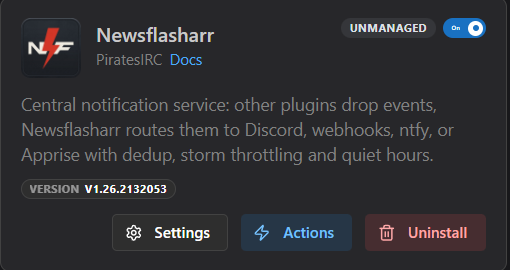
The plugin card in Dispatcharr, under Plugins then My Plugins:
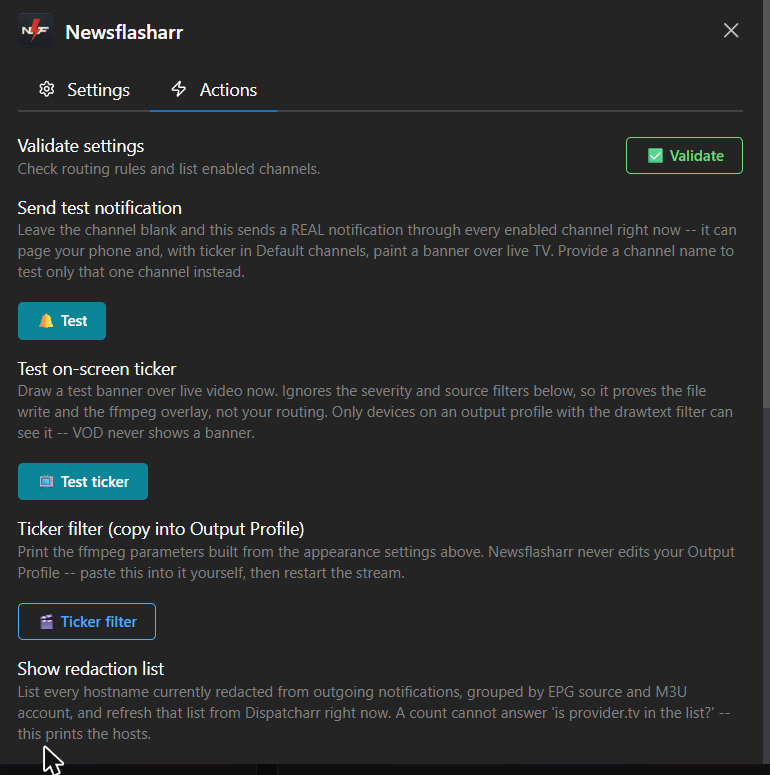
The Actions tab. Every action writes its complete output to a file, because the pop-up notification holds only about 280 characters:
The settings screens appear in the user guide, beside the instructions for filling them in.
Install
- Download
Newsflasharr.zipfrom the Releases page. The archive contains a single folder namednewsflasharr, which is the name Dispatcharr keys the plugin on, so do not rename it. - In Dispatcharr, go to Plugins, then My Plugins, and use Import Plugin to upload the file.
- Restart the Dispatcharr container. This one is not optional. The worker that collects and delivers events starts when the plugin is constructed in each web worker, and a hot reload does not reliably re-run that. Without a restart the plugin loads and looks healthy while nothing is delivered.
- Enable the plugin, then open its settings and fill in at least one channel.
- Click Validate settings. Saving the form on its own arms nothing, because Dispatcharr gives plugins no hook that runs after a save.
- Click Send test notification for each channel you configured, naming one channel at a time. Only a real send proves a channel works.
The user guide covers each of those steps in full, including installing by copying the folder yourself instead of using the archive, and what to check when a notification does not arrive.
Documentation
| Page | For |
|---|---|
| User guide | Setting up channels, routing rules, quiet hours, redaction, the on-screen ticker, and the troubleshooting ladder. |
| Caller API | The contract another plugin codes against to send events. |
| Developer guide | How the plugin is put together, how to run the tests, and how to contribute. |
| Changelog | What changed between versions. |
Anonymous usage counts
The Newsflashes Sent and Active Installs badges count every install that leaves the “Share anonymous usage counts” setting (on by default) ticked and has delivered at least one notification or had one of its actions run in the last 30 days.
Newsflashes Sent counts each notification Newsflasharr delivered, whichever channels it reached: Discord, a webhook, ntfy, Apprise, email, a Dispatcharr Connect Integration or the on-screen ticker. A notification sent to three channels counts once, and a digest counts once. A notification that is dropped, expires or fails does not count. A notification held by quiet hours or the hourly cap counts when it is finally delivered, whether the hold ends on its own or you press Flush held. A notification merged into a digest does not count by itself; the digest counts once. A test sent from Send test notification with the channel box left blank is a normal notification and counts once when delivered. A test sent to one named channel does not count, and neither does a test banner from the Test on-screen ticker button, because neither is written to the delivery ledger. The count is read from the delivery ledger, which keeps the current file and one previous file of about 10 MB each; deliveries older than that are not counted, and the badge does not go down.
When a notification is delivered, or an action finishes, the plugin sends this install’s Newsflashes Sent total and a random id for this plugin on this install to the plugin author’s counter at plugin-stats.dpas.workers.dev. It sends at most once an hour after a successful send, or ten minutes after the last successful send when a notification has just been delivered. There is no timer: a notification that falls inside the gap sends nothing, and the next delivery or action that finds the gap passed sends the total. On a quiet install the badge can therefore trail the real count until the next notification or action.
The server stores that id with the total and the date of the last report, and keeps them until this install unticks the setting and the delete succeeds, or until the plugin author removes them by hand. An install that stops reporting still counts toward Newsflashes Sent. The connection shows the server your public IP address; the server uses it only to limit abuse and does not store it in its database, though when an install first registers it keeps a salted one-way hash of it (of its /64 block for IPv6) for up to three days. Cloudflare, which hosts the server, keeps its own request logs. No names, channels, providers, messages or settings are sent. The figures are self-reported by installs and capped by the server, not verified.
What counts as an active install: an install that sent at least one report in the last 30 UTC days. A badge changes after the server’s hourly recount, which runs at the start of each UTC hour, and Shields may cache the badge for up to an hour more, so a new report can take up to about two hours to show.
The setting is the last one in the settings form, in its own section. Unticking it takes effect when the next delivery or action finishes; the plugin then asks the server to delete this install’s figures. Once the server confirms the delete, the plugin forgets its id, and ticking the setting again later starts a new one; if the delete could not reach the server, the plugin keeps the id and retries. The plugin keeps that id and the timing of its reports in /data/plugin_stats/newsflasharr/ (install_id, sent, backoff, disabled, delete_backoff, lock). To start a new id, untick the setting and let the next delivery or action finish so the delete succeeds; deleting that folder while the setting is ticked leaves the old figures on the server, and the new id then sends the full total again, so the badge counts those notifications twice.
Disclaimer
Newsflasharr provides no television content of any kind. It supplies no channels, no playlists, no streams, no electronic programme guide data and no provider accounts, and it contains no list of where to obtain any of those. It is a notification service: it reads status information that Dispatcharr already holds about the sources you configured, and it sends short messages about that status to destinations you configured.
The plugin never contacts a media provider. It never opens, fetches, decodes, records, restreams or redistributes any stream. Apart from one short usage-counter request (see Anonymous usage counts), its outbound connections are to the notification destinations you enter yourself, such as a Discord webhook, a Dispatcharr Connect Integration, an ntfy topic, an Apprise gateway or your own mail server.
You are responsible for what you connect Dispatcharr to. Whether a particular provider, subscription, playlist or stream is lawful for you to use depends on your agreement with that provider and on the law where you live. Use only sources you are authorised to use. Nothing in this project is intended to enable, encourage or assist access to content you have no right to access.
All product names, channel names, trademarks and registered trademarks mentioned in this project or appearing in its examples are the property of their respective owners. This project is an independent, community-built plugin. It is not affiliated with, endorsed by, or sponsored by any television network, broadcaster, streaming service or IPTV provider, and it is not affiliated with the Dispatcharr project beyond being a plugin written for it.
The software is provided as-is, without warranty of any kind, as set out in the licence below. This section describes the design of the software and the author’s intent. It is not legal advice. If you need to know whether your own use is lawful, ask someone qualified in your jurisdiction.
License
MIT. See LICENSE.